Snypa-D
Premium Member
-
Joined
-
Last visited
Everything posted by Snypa-D
-
-
Ive got a printers that do it cheap,just depending on what grade of paper and how many !
-
Here is a new and 'improved' version of the flyer...................opinions welcome
-
Good turn out,nice day and good to meet people :) Nice one Chris for sorting it :)
-
HERE........... http://www.evolveautomotive.com/ they did mine 300 quid ! BMW remap specialists :)
-
643 (theyll be a prize for the winner ;) )
-
You mean 'section 43' Dabs lol
-
Id love AIR on mine :) does anybody know how much it costs ??
-
GUTTED !!
-
-
Welcome to BMWOC :)
-
Welcome to BMWOC :)
-
My 99 octane is about the same as diesel at the mo :(
-
Brace yaself for the answer mate...................
-
Of course it is,theyll be no cheating on BMWOC ;)
-
630
-
youll be released Saturday ;)
-
Welcome to BMWOC :)
-
-
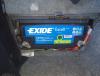
Ive mentioned my mammoth battery on here a few times now,but finally took a pic of it,never goes flat even with all 3 screens playing,plus amp etc etc and always starts 1st time all the time :) here it is .............the previous one was half the size
-
I see a pink Range Rover in London village quite a lot,very garish !!
-
627
-
and cheer the splat,I mean landing :)
-
+1
-
I LOVE COPART !! lol link doesnt go to anywhere else tho