




Jump to content
View in the app

A better way to browse. Learn more.

Bimmer Owners Club - BMW Forum for BMW Owners

A full-screen app on your home screen with push notifications, badges and more.

To install this app on iOS and iPadOS
  1. Tap the Share icon in Safari
  2. Scroll the menu and tap Add to Home Screen.
  3. Tap Add in the top-right corner.
To install this app on Android
  1. Tap the 3-dot menu (⋮) in the top-right corner of the browser.
  2. Tap Add to Home screen or Install app.
  3. Confirm by tapping Install.

Sam528i

Regular Member
  • Joined

  • Last visited

Everything posted by Sam528i

  1. Ok mate cheers On screen on dash my hand book says it's meant to say navigation as well as all the other options like on board computer and setup etc it got everything there apart from the navigation so I'm guessing the disc will put it all back on there????
  2. Cheers mate will jack her up and have a look see what I can find as for the idling I shall whip it all apart when get time and give it a clean only seems to do it till up to optimum temp
  3. Hi all I have a E39 528i sport Just wondering if more modern bmw wheels will go straight on like wheels off the newer 5 series or other series of bmw's???? Many thanks
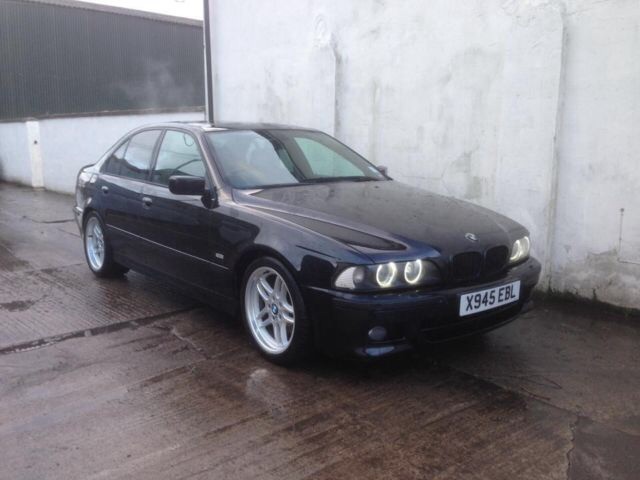
  4. Mine is a 2000 528i spot mtec And has the angel eyes have they been put in or did it come like it ?????
  5. I went for mine cause thought it will be a practical family saloon with a nice bit of performance but keeping the stylish looks
  6. Hi all I have a e39 528i sport with all mtec extra etc etc It has the built in nav screen etc but it shows maps and roads but won't let me find a destination or start a navigation it just shows the map and it looks like something from n ancient games console Can I update it all some how and make it work so can be used as a sat nav not just a map screen???? Is it just a case of putting in an updated disc???? Any help or advise be great thanks
  7. Hi all I have a E39 528i sport with all mtec extras Now it drives spot on tracks straight and don't pull when braking but my problem is every now and then when slowing down I get a loud click type tap noise from front of car quite loud and happened once when turning on full lock Any ideas????? Also when first started on a morning the engine seems to run sweet then revs seem to drop right down and back up again not constant but every 20-30 seconds buy when engine up to temperature it's fine and does not fluctuate at all Any ideas ?????? Many thanks in advance .sam.
  8. Sam528i posted a topic in Swaps Section
    Hi all looking to swap my genuine m-sport 17" alloys and tyes for a set of preferably 18" bmw alloys and tyres my wheels have been sprayed black with a silver polished lip front tyres have very good tread rears have about 3mm from wear bars I am located in burnham on sea in Somerset and can provide tea coffee etc if someone fancies a swap Here is a pic of my wheels up for swaps on my e39 sorry pic not brill it only one I have
  9. Hi all my name is Sam I am 24 and live in Somerset I have had a few bmw's in the past but I have recently just acquired my first 5 series It's a E39 528i sport m-tec Have lots of history including the list of the optional extras it has on it and I think she has 97% of the extras fitted Here is a few pics of her I hope you like and hope to speak to some of you soon All comments welcome good or bad thanks
eBay disclaimer: As the club is an eBay Partner, The club may be compensated if you make a purchase you make on eBay via the club.

DISCLAIMER: Bimmerownersclub.com is an independent BMW car forum for owners of BMW vehicles. The club is not part of BMW nor affiliated with or endorsed by the offical BMW AG in any way. The material contained in the forums is submitted by the general public, and is not endorsed by Bimmer Owners Club, BMW AG, or Bayerische Motoren Werke AG. The official website for BMW AG can be found at http://www.bmw.co.uk
Background Picker
Customize Layout

Configure browser push notifications

Chrome (Android)
  1. Tap the lock icon next to the address bar.
  2. Tap Permissions → Notifications.
  3. Adjust your preference.
Chrome (Desktop)
  1. Click the padlock icon in the address bar.
  2. Select Site settings.
  3. Find Notifications and adjust your preference.